
Coach Cockpit
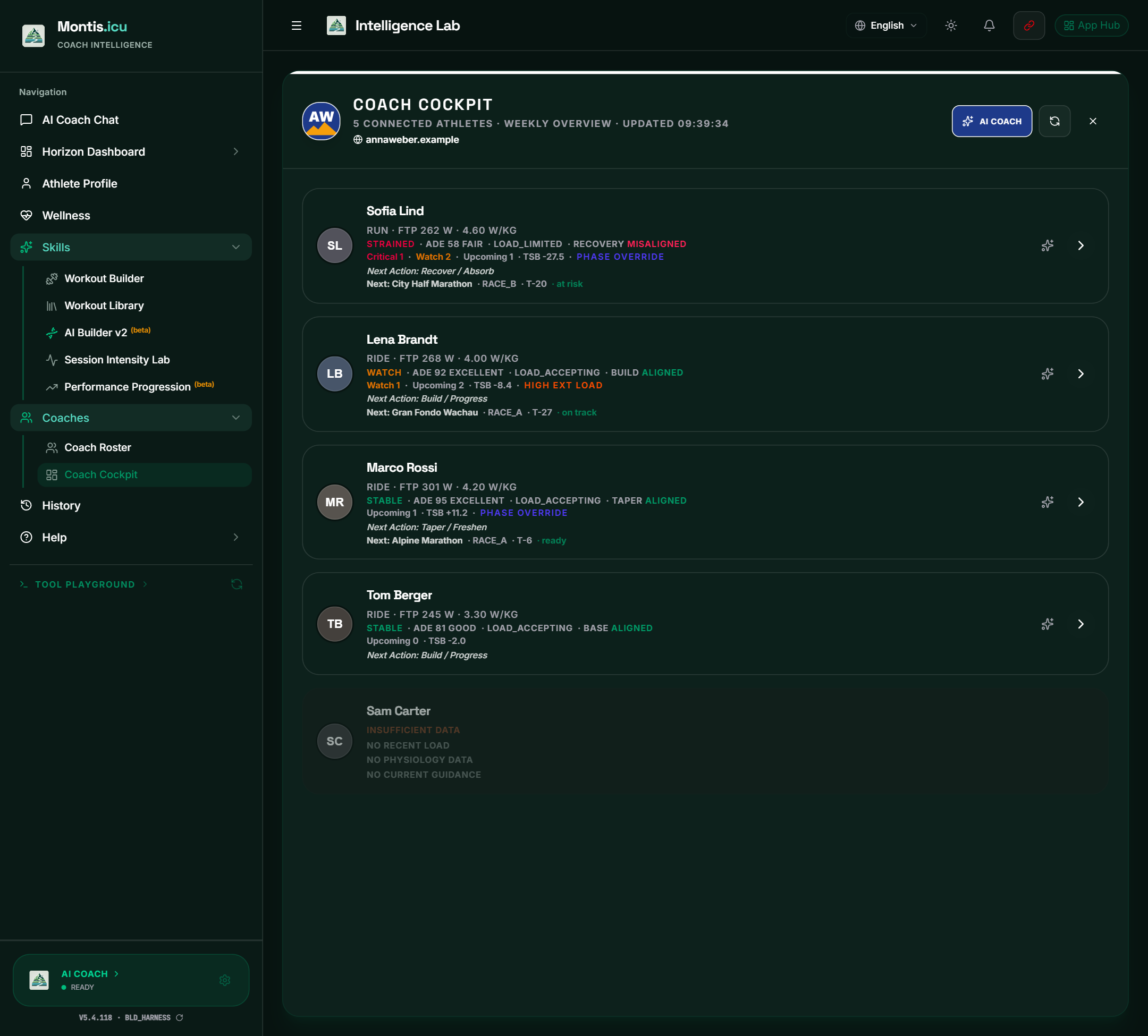
The Coach Cockpit puts all your athletes' weeks on one page, with the athletes who need attention first.
Open it
In the sidebar, open Coaches → Coach Cockpit.
The header shows your logo and website (if you set them in the hub), the number of connected athletes, and when the overview was last updated.
- The cockpit shows up to 25 athletes.
- Montis keeps the overview in your browser for 24 hours. The refresh button fetches a new one.
- AI COACH opens the AI review of your whole roster. See Cockpit AI Roster Review.
The order
Athletes with data come first. Then the order is: most critical flags, most watch flags, weakest physiology, soonest event. Athletes without recent data come last, marked INSUFFICIENT DATA, and can't be opened.
Reading a row
- Sport · FTP · W/kg.
- The physiology state (for example STABLE, WATCH or STRAINED) in green, amber or red. Then the ADE score and label (Adaptive Decision Engine), the load state (for example LOAD_ACCEPTING), and the phase the athlete needs now with ALIGNED (green) or MISALIGNED (red) against their plan.
- Critical and Watch flag counts, Upcoming events and TSB (form).
- PHASE OVERRIDE: the athlete needs to taper or recover now, so that phase takes priority over the usual guidance. The Decision Engine card shows the required phase.
- HIGH EXT LOAD: heat load was high this week. The External Context card has the details.
- Next Action from the engine, and the next event: name, category (for example RACE_A), days to go (T-27) and readiness.
Buttons on a row
- Click the row to open the athlete's cards (below). The arrow shows whether the row is open.
- Click the photo or name to act as that athlete. See Coach Roster and Acting as an Athlete.
- The sparkle button opens a Coach Review of that athlete: the AI Coach reads their cockpit data and gives a decision, the reason, the evidence, a coach action and what to watch next.
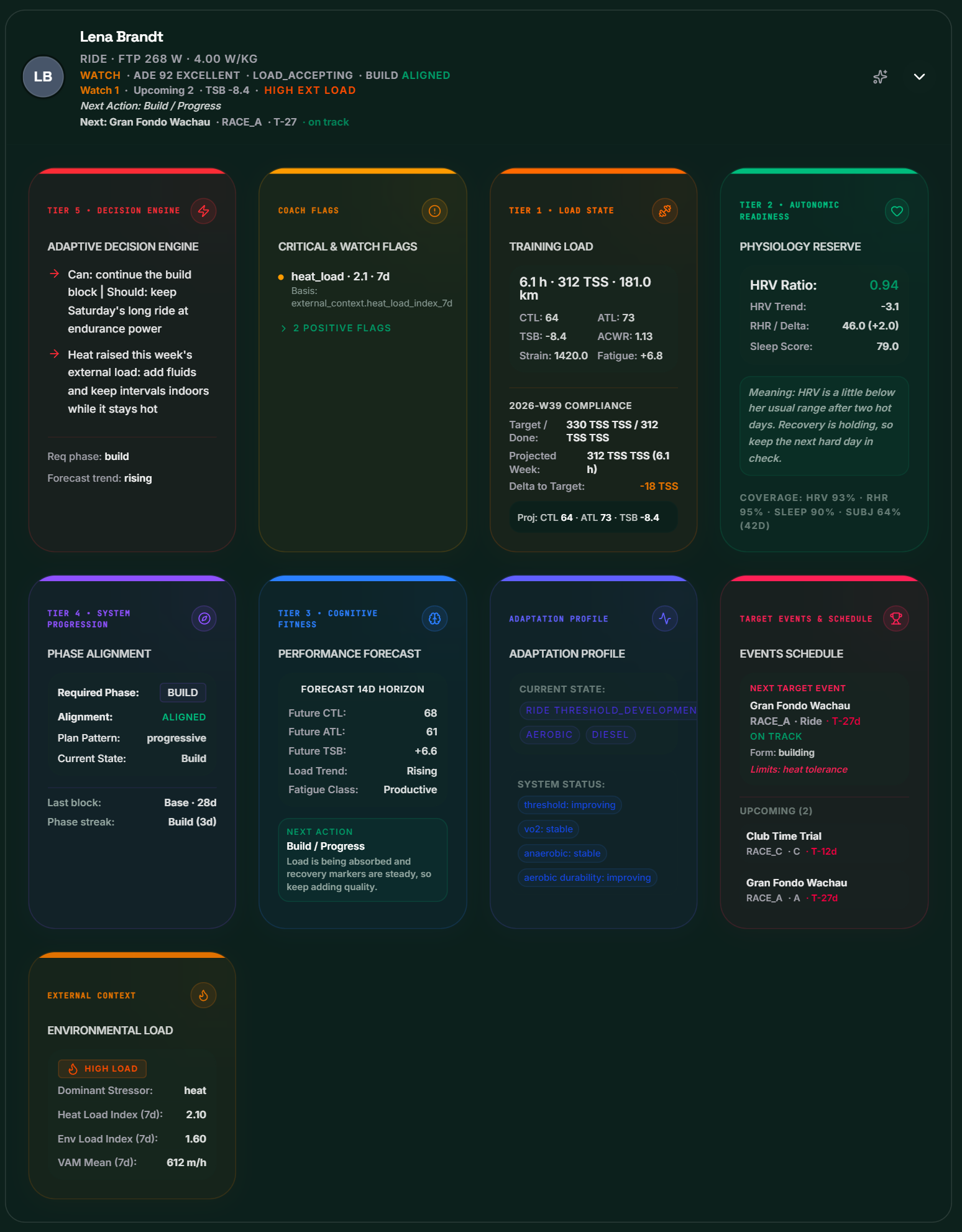
The athlete's cards
| Card | What it shows |
|---|---|
| Tier 5 · Decision Engine (Adaptive Decision Engine) | The engine's guidance for the week, the required phase, the forecast trend and whether a phase override is on. |
| Coach Flags (Critical & Watch Flags) | Each flag with its value, time window and the data it's based on. Red is critical, amber is watch. Positive flags are listed under a fold. |
| Tier 1 · Load State (Training Load) | The week's hours, TSS and distance; CTL, ATL, TSB, ACWR, strain and fatigue trend; and compliance with the weekly target: target and done, projected week, and the gap. |
| Tier 2 · Autonomic Readiness (Physiology Reserve) | HRV ratio and trend, resting heart rate and its change, sleep score, what it means, and how many days have data (coverage). |
| Tier 4 · System Progression (Phase Alignment) | Required phase, alignment, plan pattern, current state, the last block and the phase streak. |
| Tier 3 · Cognitive Fitness (Performance Forecast) | CTL, ATL and TSB at the end of the forecast (14 days), the load trend and fatigue class, and the next action with its reason. |
| Adaptation Profile | The current adaptation state and bias, the power-curve profile, and the status of each energy system (for example improving or stable). |
| Target Events & Schedule | The next target event (category, type, days to go, readiness, form and limiting factors) and the next upcoming events. |
| External Context (Environmental Load) | Only when there's data: the dominant stressor, the heat and environmental load index, and the mean climbing rate (VAM). |
Terms
- CTL: fitness, the 42-day training load.
- ATL: fatigue, the 7-day training load.
- TSB: form, CTL minus ATL.
- ACWR: acute to chronic workload ratio, this week's load against the longer-term load.
- TSS: training stress score.
- ADE: the Adaptive Decision Engine, which turns the athlete's data into the week's decision.